AI-Powered GUI Companion App
for OpenClaw
When things go wrong, the built-in AI agent diagnoses and fixes problems automatically. Install, configure, and manage OpenClaw with zero terminal — powered by Claude, GPT, Gemini, or DeepSeek.
 EN
EN 简中
简中 繁中
繁中 JA
JA ES
ES DE
DE PT
PT



⟩ What it does
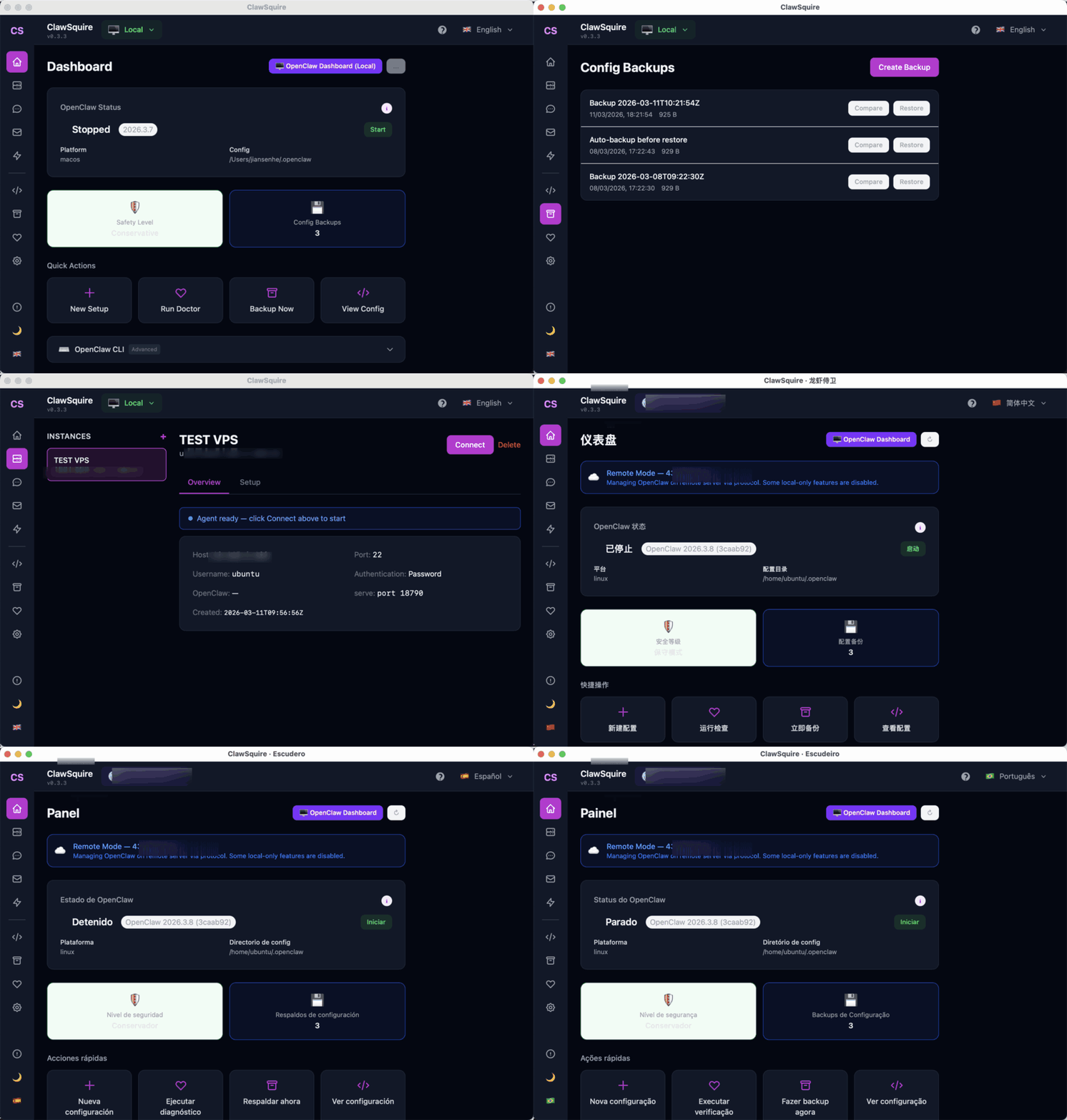
Everything you need to set up and manage OpenClaw, wrapped in a friendly GUI.
AI Fix Agent
When things go wrong, the built-in AI agent diagnoses the error and generates cross-platform fix commands automatically.
Zero Terminal
Install, configure, and manage OpenClaw entirely through a GUI. No command line required.
7 Languages
English, 简体中文, 繁體中文, 日本語, Español, Deutsch, Português (BR).
Security Presets
Conservative, Standard, Full, or Custom. Advanced features off by default.
Config Backup
Snapshot, diff, and restore your OpenClaw configuration with one click.
Health Check
Built-in doctor with categorized checks, fix hints, and exportable reports.
LLM Setup Wizard
Choose from Claude, GPT, Gemini, or DeepSeek. Test your API key before saving.
⟩ How it works
Download & Open
No dependencies. Just download the installer for your OS and open it.
Choose Your Language
Pick from 7 languages on first launch. The entire app adapts.
Follow the Wizard
Guided setup: install OpenClaw, connect an AI provider, pick a model.
⟩ Download
Latest stable: v1.0.7. Pick your device and download directly.
Need checksums or old versions? Open GitHub Releases
⟩ Guides
Step-by-step tutorials for installing, configuring, and troubleshooting OpenClaw.
Install OpenClaw
GUI and terminal methods
Connect Telegram
Set up a Telegram bot
Set Up DeepSeek
Cheapest LLM provider
VPS Setup
Remote server with SSH
Troubleshooting
Common errors and fixes
CLI Reference
Complete command cheatsheet
Connect WhatsApp
QR code pairing
Docker Setup
Docker and Compose
Remote Access
SSH, Tailscale, HTTPS
⟩ FAQ
What is ClawSquire?+
ClawSquire is a free, open-source AI-powered desktop companion for OpenClaw. When installation or operations fail, its built-in AI agent diagnoses the problem and generates fix commands automatically. It also provides guided setup, health diagnostics, configuration management, and AI assistants throughout the app. Supports 7 languages, available for macOS, Windows, and Linux.
What is OpenClaw?+
OpenClaw is an open-source AI agent platform. It lets you run LLM-powered assistants locally with support for multiple providers (DeepSeek, OpenAI, Gemini, Anthropic) and messaging channels (Telegram, WhatsApp, Discord, Gmail).
Do I need coding experience?+
No. ClawSquire is designed for non-technical users. The setup wizard guides you through installation, LLM provider configuration, and channel setup step by step.
Is it free?+
Yes. ClawSquire is MIT-licensed and completely free. You may need API keys from LLM providers (some like Gemini offer free tiers).
Which operating systems are supported?+
macOS (Apple Silicon & Intel), Windows 10+, and Linux (Debian/Ubuntu .deb and portable .AppImage).
⟩ Community
We're building in public. Join the conversation.
Want an AI agent that works 24/7 — even when your computer is off?
See what an AI agent can do on the cloud. Vibeful runs around the clock, no downloads, no API keys, no setup required.
Try Vibeful Free →Powered by Vibeful Core Engine